The best AI project for a child isn't the most impressive one. It's one they finish, that someone else actually uses, and that teaches them to think like a product designer: who is this for, what problem does it solve, and how will I know it works?
The short answer: below are 18 projects for ages 9 to 14, grouped by type. Each one is small enough to finish in one or two sessions, starts from a real person, and comes with a first prompt. For children under 13, a parent should use the AI tool on their own account while the child designs and tests. Most AI tools, including ChatGPT and Gemini, require users to be at least 13.
How to pick a project
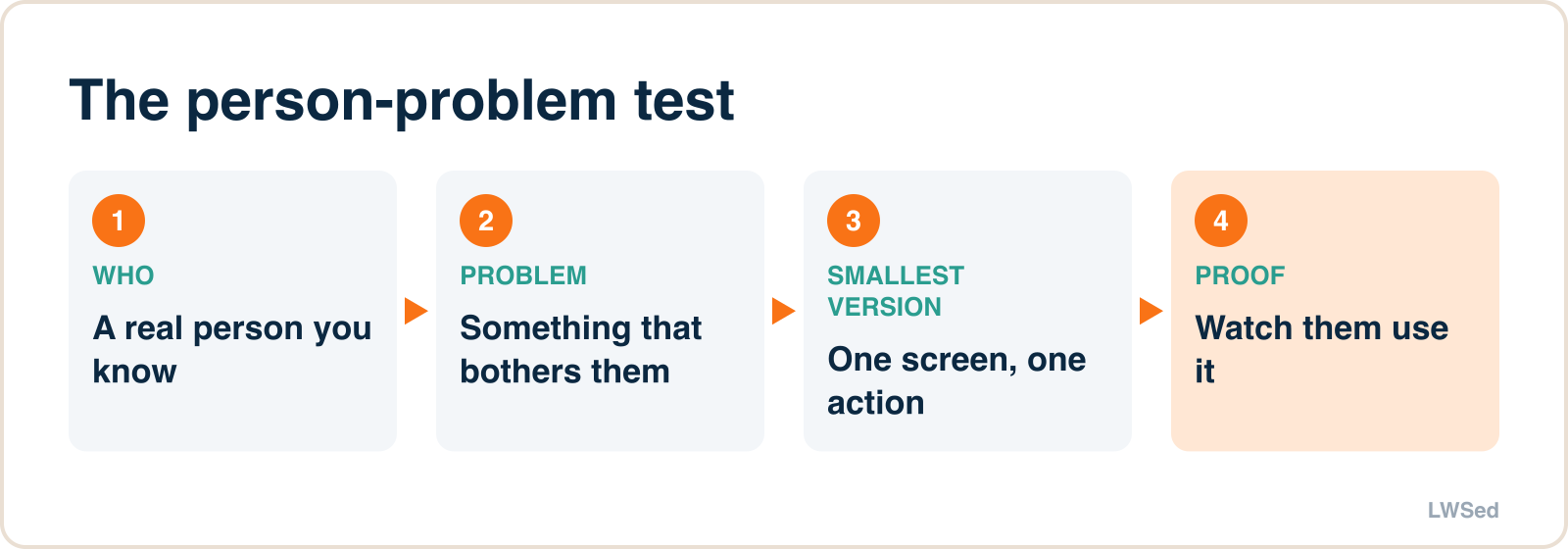
Use the person-problem test. A good project fills in this sentence:
"A ___ for [a real person] who [has a real problem]."
"A spelling quiz for my brother, who has a test on Friday" is a great project. "An AI that does everything" is not. Every idea below already fills in the sentence; your child should change the person to someone they know.
Games (best first projects)
| Project | Who it's for | First prompt (the parent types) |
|---|---|---|
| Fruit catcher | A younger sibling on a car trip | "Make a one-page browser game: a basket moves with the arrow keys, fruit falls, catch 1 = 1 point, miss 3 = game over, big bright text." |
| Times-table racer | A classmate learning the 7 times table | "A browser game that shows a times-table question and four answers; a car moves forward on each right answer; 10 right wins." |
| Maze escape | Friends at a sleepover | "A simple maze game in one web page, arrow keys to move, a timer, three levels that get harder." |
| Memory match | Grandparents | "A card-matching memory game with 12 cards showing simple coloured shapes, and a move counter." |
| Spot the planet | A science class | "A quiz game: show a planet's fact, click the right planet from four buttons, score out of 10." |
| Reaction tester | The family | "A page that turns green at a random moment; click as fast as you can; show the reaction time and the best of five." |
Tools for home and school
| Project | Who it's for | First prompt |
|---|---|---|
| Spelling quiz | A brother with a test on Friday | "A page where I type 10 spelling words, then it reads each one out using the browser's voice and checks what my brother types." |
| Chore chart | The whole family | "A family chore chart page with names, chores and tick boxes that saves in the browser and resets every Monday." |
| Homework timer | Me, when I get distracted | "A 25-minute focus timer with a 5-minute break, a big progress bar and a gentle sound at the end." |
| Pocket-money tracker | Me | "A page to record money in and out, show the total, and a goal bar for something I'm saving up for." |
| Book log | A reading challenge at school | "A page to log books read with title, pages and a star rating, and a total pages count." |
| Plant watering reminder | A parent's houseplants | "A page listing plants with how often each needs water, showing which are due today." |
Creative projects
| Project | Who it's for | First prompt |
|---|---|---|
| Choose-your-own story | A younger cousin | "A choose-your-own-adventure story page with 6 scenes and two choices at each, written for a 6-year-old." |
| Comic planner | Me and a friend | "A page that splits the screen into 6 comic panels where we can type a caption and pick a background colour for each." |
| Joke of the day | My class | "A page that shows a different clean, kid-friendly joke each day from a list of 30 I'll write myself." |
Projects for older children (12–14)
| Project | Who it's for | What makes it harder |
|---|---|---|
| Class quiz builder | A teacher | Questions typed in by the user, randomised order, a results screen |
| Club sign-up page | A school club | A form, a list of who signed up, simple rules (no duplicates) |
| Two-player game | Siblings | Two sets of controls, fair rules, a rematch screen |
For a 12- or 13-year-old, the next step is reading the code the AI writes and changing small things themselves: a colour, a speed, the number of lives. That's where real coding starts, and it's why the basics still matter (see should kids still learn to code?).
How to run a project session
- Fill in the person-problem sentence.
- Draw the screen on paper.
- Parent types the first prompt using the child's words.
- Test with the real person. Watch them use it and say nothing.
- Change one thing at a time, with the child deciding what.
The full step-by-step, with example prompts for fixing problems, is in vibe coding for kids: a first game with a parent.
Rules that keep it safe
- Parent's account, parent at the keyboard, following each tool's age rules (ChatGPT: 13+, with a parent's permission under 18; Gemini: 13+, or younger via Google Family Link if a parent enables it, not in the UK or EU; Claude: 18+).
- No personal details or photos of children in prompts.
- Projects that "talk" (chatbot projects) should use a fixed list of answers the child writes, not a live AI, for under-13s.
- Share inside the family first; never publish with a child's name or photo.
Why projects beat tutorials
Tutorials teach children to follow steps. Projects teach them to decide what the steps should be. Employers surveyed for the World Economic Forum's Future of Jobs Report 2025 named analytical thinking the most sought-after core skill, and creative thinking and curiosity are rising. A child who has designed, tested and improved a spelling quiz for their brother has practised all three.
Want to see where projects lead? Every game in our LWSed Game Studio was planned like a product, then built with AI. For the skills behind it, see future skills for kids in the AI era.
Building projects is one side of AI; schoolwork is the other. See does AI help or hurt learning? for what the studies show.
Frequently asked questions
What are some simple AI projects for kids? Good first projects are small and for a real person: a fruit-catching game for a sibling, a spelling quiz for a test, a family chore chart, a homework timer, or a choose-your-own story for a younger cousin. Each can be finished in one or two sessions.
What AI project can a class 9 student do? A class quiz builder, a club sign-up page or a two-player game are good choices at 13 to 14. The extra challenge is reading and changing the code the AI writes, and handling user input and rules.
Can a 9-year-old do an AI project? Yes, with a parent using the AI tool. Most AI tools require users to be at least 13, so the parent types while the child designs the project, tests it with real people and decides what to change.
Which AI tool is best for kids' projects? Any major chatbot that can write a simple web page works. What matters more is the tool's age rules: ChatGPT and Gemini require users to be 13 or older (Gemini can be switched on for younger children by a parent through Family Link), and Claude requires users to be 18.
Want to build one with a teacher? Our free Sunday workshop, Build a game with AI, is for ages 9 to 14.