LWSed's AI classes teach children aged 10 to 18 to turn their own ideas into working products with AI: a game, a web app, a study tool or an AI assistant. Our students plan first, build with the AI tools their age allows, check everything the AI gives back, and test what they made with real people. We call the two outcomes AI-ready and product-ready. This post explains why we teach it this way, and why it is different from the coding classes many parents remember from 2020.
The short answer:
- In 2020 the pitch was "your child can build apps if they learn to code". The tools of the time made that hard for a young child, and India's advertising regulator asked the best-known coding platform to withdraw ads that went too far.
- In 2026 AI writes most of the code. A child can describe a game and get a working first version in minutes, so the hard part is no longer typing; it is deciding what to build, for whom, and whether it works.
- AI-ready means a child uses AI as a coach, not a crutch, and knows each tool's age, privacy and school rules. Product-ready means a child can take an idea from a real person's problem to something that person uses.
- Every class has guardrails: each tool's age rules, no personal data, no homework done by AI, and a coach who checks the work.
What did the 2020 coding boom promise?
In 2020, with children learning from home, online coding classes for children were advertised heavily in India. In August 2020, BYJU'S bought WhiteHat Jr, the best-known of the platforms, for $300 million. Its advertising told parents that young children who learned to code could build apps and become startup founders, and it featured Sundar Pichai, Bill Gates and Steve Jobs.
In October 2020 the Advertising Standards Council of India (ASCI) processed complaints against seven WhiteHat Jr ads and found five in potential violation of its code, for dubious and unsubstantiated claims. WhiteHat Jr withdrew the five. The company's later years were difficult: it reported a loss of ₹1,690 crore in 2020–21, laid off more than 300 people in 2022, and in February 2023 BYJU'S denied reports that it would shut the platform, saying it was optimising it.
We bring this up not to score a point. The idea under the pitch was right: children should make things, not only consume them. The problem was the distance between the promise and the tool. A young child typing code in 2020 could make a simple program with a lot of help; the app in the advert was usually out of reach. That gap is what has changed.
What has changed since 2020?
Three things, each on the record:
- AI now writes most of the code. Collins Dictionary made "vibe coding", building software by describing what you want to an AI and steering it, its Word of the Year for 2025. A child who can explain a game clearly can see a playable first version the same afternoon. Our own guide, vibe coding for kids, walks a 9-year-old and a parent through one.
- Children are already using AI, mostly without teaching. 64% of US teens use AI chatbots (Pew Research, February 2026), and 73% say no teacher has ever explained what AI is or how it works (Common Sense Media, August 2026). In India, CBSE's new computational thinking and AI curriculum starts in Class 3 from 2026–27 (Press Information Bureau, April 2026).
- How a child uses AI decides whether it helps. In a study of about 1,000 students, those who practised with an AI that gave answers scored 17% lower on the exam; with an AI tutor that gave only hints, there was no drop (Bastani and colleagues, PNAS, 2025). We cover the evidence in does AI help or hurt learning?.
Put together: building is now within a child's reach, the child is already using the tools, and the habit they form now decides whether AI makes them sharper or lazier. That is the job of a class.
What does "AI-ready" mean for a child?
An AI-ready child uses AI to think better, not to avoid thinking, and knows the rules of the tools they use. In practice that means five habits, which we teach in every class:
- Plan before prompting. Write down what you want and why before you open the tool.
- Describe precisely. Say who it is for, what it must do and what it must not do. A vague request gets a vague result.
- Check what comes back. Run it, read it, test the edge cases, and look up any fact that matters. AI is often confidently wrong.
- Keep the thinking. Ask for hints and explanations rather than answers, especially for schoolwork. Our crutch or coach test takes five minutes.
- Know the rules. Each tool's age limit, what not to share (names, photos, addresses, school), and when a school allows AI help at all.
These are the same three moves as the LWS method in chess, applied to AI: plan first, check what the AI gives back, learn from every project.
What does "product-ready" mean?
A product-ready child can take an idea from a real person's problem to something that person actually uses. The code is the AI's part; the decisions are the child's. We teach it as a loop of six steps, and a child goes round it many times:
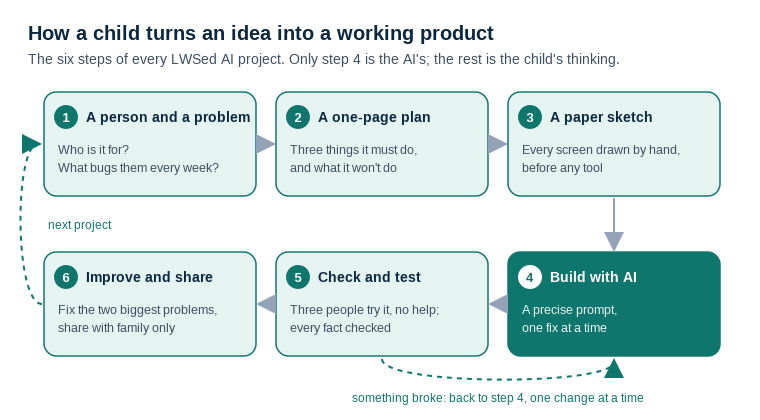
- A person and a problem. "My sister forgets her spelling words" beats "an app".
- A one-page plan. Who it is for, the three things it must do, what it won't do, and how we'll know it works.
- A paper sketch. Screens drawn by hand, before any tool is opened.
- Build with AI. The child describes the plan; the AI builds a first version.
- Check and test. Does it do the three things? Three real people try it while the child watches and takes notes.
- Improve and share. Fix what confused people, then share it safely with the people it was for.
Steps 1, 2, 3, 5 and 6 are human work: understanding people, deciding, explaining, judging. They are also the skills employers rank highest; in the World Economic Forum's Future of Jobs Report 2025, analytical thinking is the most sought-after core skill and AI and big data the fastest-growing. Our future skills post goes deeper. The step-by-step method, with templates, is in how kids turn an idea into a working app with AI.
Coding class then, AI product class now
| A typical coding class (2020) | An AI product class (LWSed, 2026) | |
|---|---|---|
| Where a child starts | Syntax: variables, loops, a turtle drawing a square | A real person's problem, written down |
| What takes most of the time | Typing and fixing code | Planning, explaining, testing, improving |
| What the AI does | Nothing (or wasn't allowed) | Writes the first version and the fixes |
| What the child is judged on | Whether the code runs | Whether the product does its job for the person |
| Time to a first working thing | Usually weeks, for anything beyond a simple program | Often the same session |
| What is checked | The code | The plan, the result, the facts and the safety |
| Typical promise | "Build apps, start a company" | A working project and the habits to make the next one |
Code still has a place. Children who later learn a programming language find it easier once they know what they want to build, and our should kids still learn to code? answer is "yes, later, and for the right reasons".
Which tools, at which age?
We follow each tool's own rules. ChatGPT requires users to be at least 13, with a parent's or guardian's permission under 18. Gemini's minimum is also 13, though a parent can turn it on for a younger child through Google Family Link. Claude requires users to be 18, so no LWSed student uses Claude. Midjourney is 13 and up.
| Age | What a child builds | Who runs the AI tool |
|---|---|---|
| 10–12 | Games and stories | The child designs and writes the prompts; the coach runs the AI on screen |
| 13–15 | Web apps and study tools | ChatGPT or Gemini, on an account the parent agrees to |
| 16–18 | AI assistants and a portfolio | Tools that use AI, tested and shipped for real users |
Alongside the AI assistants, the toolkit includes Canva, Gamma, NotebookLM, Perplexity and Teachable Machine, each used within its own terms. Children under 13 design the project while the coach runs the tool.
The guardrails in every class
Safety isn't a lesson at the end; it is part of every project:
- Age rules first. A child only uses a tool their age allows, on an account a parent agrees to. Under-13s plan, write the prompts and judge the results while the coach runs the tool.
- No personal data. No real names, photos, school names, addresses or phone numbers go into an AI tool, and nothing a child builds collects them.
- No homework by AI. We don't do schoolwork in class. A creative school project is welcome, done the honest way: the child plans, the AI helps, and they say what it did.
- Check every fact. Anything an AI states as true is looked up before it goes into a project.
- Know what AI can't do. Spotting AI-made images, knowing when not to use AI at all, and why a confident answer can still be wrong.
- Parents are welcome to sit in.
For the questions parents ask most, see is AI safe for kids to learn?
What we don't promise
We learned from 2020. We won't tell you your child will be the next Sundar Pichai, earn money from an app store, or found a company at nine. What we promise is checkable: a working project your child planned and tested, the habits to make the next one without us, and honest rules about tools and school. You can see the kind of thing we mean in the LWSed Game Studio: 13 games, each planned like a product and then built with AI, the way the AI classes teach.
Who teaches, and how to start
AI classes are taught by computer science engineers from the LWSed team, led by founder and head coach Bhaskar Gupta, in live small groups of 4 to 6 or 1:1 on Zoom. Classes run in English or Hindi. Plans start from ₹2,999 a month in India and $79 in the US; see all fees.
- Ages 10 to 18: book a free 30-minute trial class, or read about the AI programme.
Frequently asked questions
What do children learn in LWSed's AI classes? They learn to turn their own idea into a working product with AI: planning it, describing it precisely, building it with the AI tools their age allows, checking what the AI gives back, and testing it with real people. Ages 10 to 12 build games and stories, 13 to 15 build web apps and study tools, and 16 to 18 build AI assistants and a portfolio.
Is an AI class better than a coding class for my child? For most children aged 10 to 15, yes as a first step: AI now writes most of the code, so the skills that matter are deciding what to build, explaining it and checking it. Learning a programming language later is easier once a child knows what they want to make.
What does "AI-ready" mean? An AI-ready child uses AI as a coach rather than a crutch: they plan before prompting, describe precisely, check what comes back, keep the thinking for themselves, and know each tool's age, privacy and school rules.
Is it safe for children to use AI tools? With rules, yes. We follow each tool's age limits (ChatGPT 13+; Gemini 13+, or younger only through a parent's Google Family Link; Claude 18+), keep personal data out of every tool, never do homework with AI, and check every fact. Under-13s design and judge while the coach runs the tool.
Why do you mention WhiteHat Jr? Because many parents remember its promise that children could build apps by learning to code. In October 2020 India's advertising regulator found five of its ads in potential violation of its code for unsubstantiated claims. We think the idea of children making things was right; we just won't promise more than a child can do.
Sources
- The News Minute, Pulled up for violation, WhiteHat Jr withdraws ads on coding for kids (28 October 2020): ASCI's review of seven ads, five withdrawn, and the $300 million acquisition by BYJU'S in August 2020.
- ThePrint, BYJU'S denies coding platform WhiteHat Jr shutting down (24 February 2023): the 2020–21 loss, the 2022 layoffs and BYJU'S statement.
- Collins Dictionary, Word of the Year 2025: "vibe coding" (announced 6 November 2025).
- Pew Research Center, How Teens Use and View AI (24 February 2026).
- Common Sense Media, teens who use AI for schoolwork (August 2026).
- Bastani, H. et al., Generative AI without guardrails can harm learning, PNAS (2025).
- Press Information Bureau, CBSE computational thinking and AI curriculum for Classes 3–8 (1 April 2026).
- World Economic Forum, The Future of Jobs Report 2025 (January 2025).
- Age rules from each company's own terms: OpenAI, Google Gemini, Anthropic, checked 30 October 2026; Gemini for under-13s from Google's Family Link help page, checked 25 November 2026.
Curious what your child could build? Book a free 30-minute AI trial class; AI classes are for ages 10 to 18.